
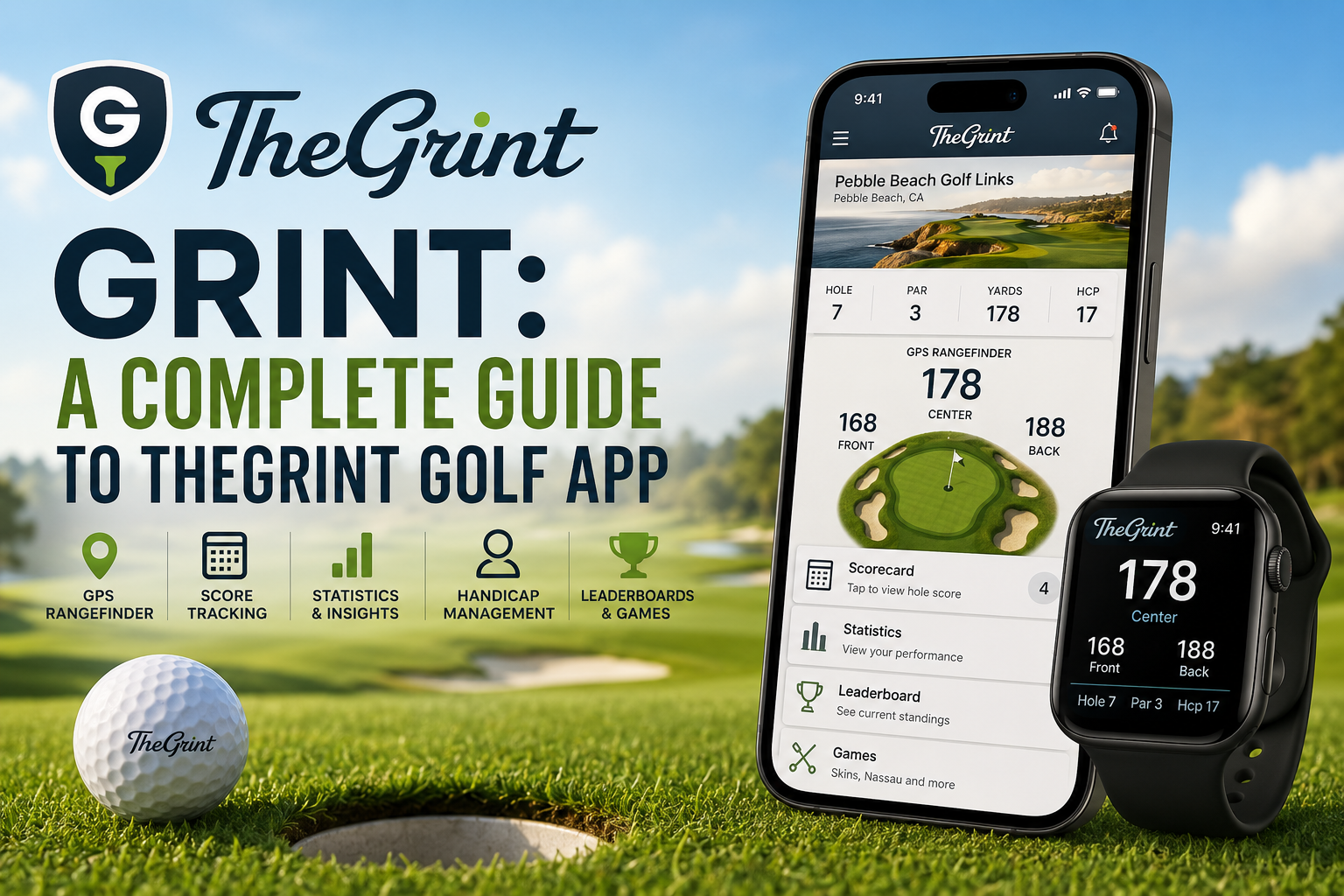
Grint: A Complete Guide to TheGrint Golf App
If you want to keep your golf scores organized, understand your performance, and get useful course information from your phone or smartwatch, Grint is a golf app worth knowing.
Better known as TheGrint, the platform combines golf score tracking, GPS distances, handicap management, statistics, social features, games, and performance analysis in one place. TheGrint says its GPS coverage includes more than 40,000 mapped golf courses worldwide, while its current app also offers handicap and statistical tools for golfers at different skill levels.
What makes Grint particularly interesting is that it is not simply a digital scorecard. A golfer can use it during a round to record scores and distances, then return later to study trends and identify areas that need improvement.
This guide explains what Grint is, how its major features work, what you can do with the free and Pro versions, and whether it makes sense for your golf routine.
Key Takeaways
- Grint, officially known as TheGrint, combines golf GPS, score tracking, handicap tools, statistics, and social features.
- The app provides GPS information for more than 40,000 mapped golf courses worldwide.
- Golfers can track scores and statistics such as putting, greens in regulation, fairways hit, and scrambling.
- TheGrint supports official handicap management in the United States and international handicap functionality through its stated partnerships.
- TheGrint Pro adds advanced statistics, green maps, shot tracking, expanded social features, and other premium tools.
- Its biggest strength is combining on-course tracking with long-term performance analysis.
What Is Grint?
Grint is a golf tracking and performance app developed by TheGrint. It was originally created around golf handicap and score tracking but has expanded into a broader platform for golfers.
The company says its journey began in 2012 with the goal of making legitimate golf handicap access more accessible to amateur golfers. Today, the platform combines handicap services with GPS, scorecards, statistics, games, leaderboards, and social functionality.
The app is available for mobile devices, while TheGrint also provides a web experience designed for reviewing and analyzing golf data on a larger screen.
In practical terms, you can think of Grint as several golf tools combined into one:
- Digital golf scorecard
- GPS golf rangefinder
- Handicap tracker
- Golf statistics dashboard
- Round history
- Social golf platform
- Competition and leaderboard tool
- Performance analysis system
That combination is what separates Grint from a simple scorekeeping app.
How Does Grint Work?
The basic idea behind Grint is straightforward: record your rounds consistently, and the platform turns that information into useful golf data.
During a round, you can use your phone or compatible smartwatch to record scores. Depending on the features available to your account and device, you can also access GPS distances, track shots, and record additional statistics.
After the round, the information becomes part of your playing history. Over time, this creates a larger dataset that can reveal patterns in your game.
For example, suppose your overall score has remained relatively stable for several months. Looking only at your score might not tell you why.
Your Grint statistics could reveal that:
- Your putting has improved.
- Your greens-in-regulation percentage has increased.
- Your fairways hit have declined.
- Your scrambling performance has remained weak.
- Your performance on certain types of holes is costing strokes.
That is where a golf tracking platform becomes more useful than a traditional paper scorecard.
Grint GPS and Golf Rangefinder Features
One of Grint’s most practical features is its GPS functionality.
TheGrint currently advertises GPS maps covering more than 40,000 golf courses worldwide. The GPS system can provide distances to greens, hazards, and landing areas, helping golfers make more informed club and shot decisions.
Understanding GPS Distances
Rather than relying entirely on course markers or estimating yardage, golfers can use the app to check distances directly.
For example, before hitting an approach shot, you might want to know:
- How far you are from the green.
- Where hazards are positioned.
- How much room exists around your intended landing area.
- Whether your preferred club gives you enough margin for error.
The value of GPS is not necessarily hitting the ball farther. It is making better-informed decisions.
Green Maps
Green maps are another feature associated with Grint.
The current platform lists detailed green maps among its Pro features, allowing golfers to study slopes and breaks when planning approach shots and putts. The company says its Pro offering includes green maps for more than 25,000 courses.
Availability and functionality can vary by course and subscription, so golfers should check the current coverage for the courses they regularly play.
Grint Scorecard and Score Tracking
Score tracking is at the heart of the Grint experience.
Instead of carrying a traditional scorecard and pencil, golfers can enter their scores directly into the app as they play. The platform can store round histories, allowing golfers to revisit previous performances later.
This creates a useful digital record of your golf.
What Can You Track?
Depending on your setup and subscription, Grint can track much more than your final score.
The platform highlights statistics including:
- Score
- Putting
- Greens in regulation
- Fairways hit
- Scrambling
- Iron accuracy
- Other performance measurements
The current app listing also describes more than 18 advanced golf statistics, while TheGrint’s website promotes expanded Pro analytics with more than 50 performance statistics.
The exact features available can change as the service develops, particularly between free and Pro memberships.
Grint Handicap Tracking
Handicap management is one of the features that helped establish Grint’s identity.
In the United States, TheGrint states that it is a licensed handicap data affiliate of the USGA. The platform allows golfers to link and manage handicap information, while its international functionality includes support through the Golf Handicap for Amateurs Platform, or GHAP.
A handicap is useful because raw scores do not always provide a fair way to compare golfers with different abilities.
For example, a golfer who regularly shoots around 80 and another who regularly shoots around 100 can still compete in a handicap-based game. The handicap system helps create a more meaningful comparison.
Grint can therefore serve both recreational golfers who simply want to understand their progress and players who regularly participate in handicap-based competitions.
Grint Golf Statistics and Performance Analysis
Recording scores is only the beginning.
The real long-term value of a platform like Grint comes from reviewing your data.
Imagine that you have recorded 30 rounds. Instead of remembering how you felt during each round, you can look at the accumulated statistics and search for recurring weaknesses.
Statistics Can Reveal Patterns
Consider a golfer who believes their biggest problem is driving.
Their data might tell a different story.
Perhaps their driving accuracy is average, but their putting performance is costing several strokes per round. Or perhaps their approach shots are creating too many difficult birdie and par opportunities.
This distinction matters because improvement becomes easier when you know what to work on.
TheGrint says its advanced statistics and benchmark tools can help golfers compare their performance against targets for their skill level.
Using Data Without Becoming Obsessed
Golf statistics are helpful, but they should support your game rather than overwhelm it.
You do not need to analyze every statistic after every round.
A better approach is to choose two or three areas that matter most.
For example:
- Fairways hit
- Greens in regulation
- Putts per round
Track them over several rounds, then look for meaningful trends.
That approach makes the information easier to understand and more actionable.
Grint Pro: What Does the Premium Version Offer?
TheGrint offers both free and paid functionality.
The current Pro offering includes additional tools designed for golfers who want deeper analysis and more advanced on-course functionality. The official site currently lists advanced statistics, expanded friend rankings, insights and targets, score-picture services, unlimited score imports, and additional features among its Pro benefits.
The current app listing also highlights Pro features such as:
- Advanced golf statistics
- Detailed green maps
- Shot tracking
- Club insights
- Smartwatch scoring
- Smartwatch shot tracking
- Additional game formats
- Scorecard picture uploads
Because subscription prices and feature packages can change, it is sensible to check the current membership information before purchasing.
Free Grint vs TheGrint Pro
The choice between free and Pro largely depends on how seriously you want to analyze your golf.
| Feature | Free | Pro |
|---|---|---|
| Basic score tracking | Yes | Yes |
| Basic golf statistics | Yes | Yes |
| GPS course maps | Yes | Yes |
| Handicap functionality | Available | Expanded options |
| Advanced statistics | Limited | Expanded |
| Detailed green maps | Limited/varies | Yes |
| Shot tracking | Limited/varies | Yes |
| Advanced insights | Limited | Yes |
| Scorecard picture service | Limited | Expanded |
| Advanced games | Limited | Expanded |
The exact feature availability can vary by platform and may change over time, so this table should be treated as a general comparison rather than a permanent pricing or feature guarantee.
Grint and Smartwatches
One particularly useful feature for golfers who dislike carrying their phone around the course is smartwatch support.
TheGrint currently promotes smartwatch functionality for GPS distances, score tracking, and shot tracking. Its website lists compatibility with Apple Watch and Android-based Wear OS devices, although specific device requirements can change as software and hardware are updated.
A smartwatch can make on-course tracking less disruptive.
Instead of repeatedly taking your phone out of your pocket, you can glance at your wrist for relevant information and enter scores more conveniently.
For golfers who already use a compatible smartwatch, this can make the app feel much more integrated into a normal round.
Grint Games, Leaderboards and Social Features
Golf is often more enjoyable when friends are involved, and Grint places considerable emphasis on social competition.
The platform supports games and leaderboards that can make ordinary rounds more competitive.
Depending on the available features, golfers can organize formats such as:
- Skins
- Stableford
- Match play
- Wolf
- Vegas
- Other game variations
TheGrint also promotes live leaderboards and social features that allow golfers to follow scores, share rounds, and compete with friends.
This can be particularly useful for golf groups that play together regularly.
Rather than calculating every result manually, the app can handle much of the scoring process.
Scorecard Picture Service
Another practical Grint feature is its scorecard picture service.
Instead of manually entering every detail after finishing a round, eligible users can photograph a paper scorecard and upload the image. The service can then process the scorecard and add the information to the account. The feature is promoted as a Pro benefit on the current platform.
This is especially useful when you prefer playing with a physical scorecard but still want a digital history of your rounds.
It also illustrates an important strength of Grint: the service accommodates different approaches to scorekeeping rather than forcing every golfer into exactly the same workflow.
Who Should Use Grint?
Grint can make sense for several types of golfers.
Beginners
New golfers can use it to become more comfortable with tracking scores and understanding basic golf statistics.
However, beginners should avoid worrying about every metric. Learning fundamentals and enjoying the game should come first.
Regular Recreational Golfers
This may be the strongest use case.
If you play regularly with friends and want to know whether your game is improving, maintaining a digital record can be extremely useful.
Competitive Amateur Golfers
Players who participate in competitions or organized games may appreciate handicap management, live leaderboards, statistics, and multiple game formats.
Data-Oriented Golfers
Golfers who enjoy analyzing performance can get significantly more value from the advanced statistics and benchmarking tools available through Pro.
Who May Not Need Grint?
Not every golfer needs a dedicated tracking platform.
You may not need Grint if you:
- Play golf only a few times a year.
- Prefer a traditional paper scorecard.
- Do not care about statistics.
- Already use another golf ecosystem that meets all your needs.
- Find phone-based tracking distracting during a round.
The best golf app is ultimately the one you will actually use consistently.
An app with dozens of features provides little benefit if you stop recording your rounds after two weeks.
How to Get More Value From Grint
Using Grint effectively is less about turning on every feature and more about developing a consistent routine.
1. Record Every Round
The more complete your playing history becomes, the more useful your long-term data can be.
2. Track Meaningful Statistics
Start with a small number of metrics rather than trying to monitor everything.
3. Review Trends
Look beyond individual rounds. One terrible putting day does not necessarily mean your putting needs a complete overhaul.
4. Compare Performance Over Time
Look for changes across several rounds or months.
5. Turn Data Into Practice Goals
If your statistics repeatedly identify weak scrambling, for example, spend more practice time around the green.
6. Use GPS Strategically
GPS information is most useful when it helps you choose a smarter target or safer shot.
The goal is not to stare at your phone before every shot. The goal is to make better decisions with less guesswork.
Is Grint Worth It?
For golfers who want a combination of score tracking, GPS, handicap management, statistics, and social competition, Grint offers a broad feature set in one platform.
The free functionality can be enough for golfers who primarily want digital scorekeeping, basic GPS features, and a record of their rounds. More committed golfers may find the Pro tools more compelling because of the additional statistics, green maps, shot tracking, insights, and expanded features.
The key question is not simply whether Grint has enough features.
It is whether those features solve a problem for you.
If you regularly wonder where you are losing strokes, want easier access to course distances, or enjoy competing with friends, the app can become a useful part of your golf routine.
Frequently Asked Questions
What is Grint used for?
Grint, officially TheGrint, is used for golf score tracking, GPS distances, handicap management, golf statistics, leaderboards, games, and performance analysis.
Is Grint free?
Yes. TheGrint offers free functionality, while TheGrint Pro provides additional premium features. The exact feature set and pricing can change, so golfers should check the current membership options before subscribing.
Does Grint have a golf GPS?
Yes. TheGrint provides GPS distances and course maps, with the company currently advertising coverage for more than 40,000 mapped courses worldwide.
Can Grint track a golf handicap?
Yes. The platform supports handicap management and states that it is a licensed handicap data affiliate of the USGA in the United States. It also provides international handicap support through GHAP.
Does Grint work with smartwatches?
Yes. TheGrint supports smartwatch functionality for compatible devices, including GPS distances, score tracking, and shot tracking. Supported hardware and requirements may vary.
What golf statistics does Grint track?
Depending on the account and feature level, Grint can track statistics such as putting, greens in regulation, fairways hit, scrambling, iron accuracy, and other performance metrics. Pro users can access a broader collection of advanced statistics.
Does Grint have green maps?
Yes. Green maps are available as part of TheGrint’s premium functionality, with the company currently listing detailed maps for more than 25,000 courses.
Is Grint good for beginners?
Yes, particularly if a beginner wants to develop a consistent record of scores and gradually learn about golf statistics. Beginners should focus on simple score tracking first and introduce more advanced metrics as their understanding of the game develops.
Conclusion
Grint, or TheGrint, has evolved far beyond a basic digital golf scorecard. It brings together GPS course information, score tracking, handicap management, statistics, social competition, leaderboards, and performance analysis in a single golf platform.
Its biggest advantage is the connection between what happens during a round and what you can learn after the round. Recording a score is useful, but understanding why that score happened is even more valuable.
For casual golfers, the free features may provide everything necessary to keep track of rounds and basic performance. For regular players who want deeper statistics, green maps, shot tracking, smartwatch functionality, and additional analysis, TheGrint Pro offers a broader toolkit.
Ultimately, the most valuable feature is consistency. Use Grint regularly, review your data intelligently, and turn what you learn into practical decisions on the course and focused practice away from it.











Leave a Reply